How Form Data Moves Through ASP.NET Core MVC
This article follows one trip through the Survey Says Demographics form: loading the
form, submitting it, validating it on the server, and either saving it or sending it back
with errors.
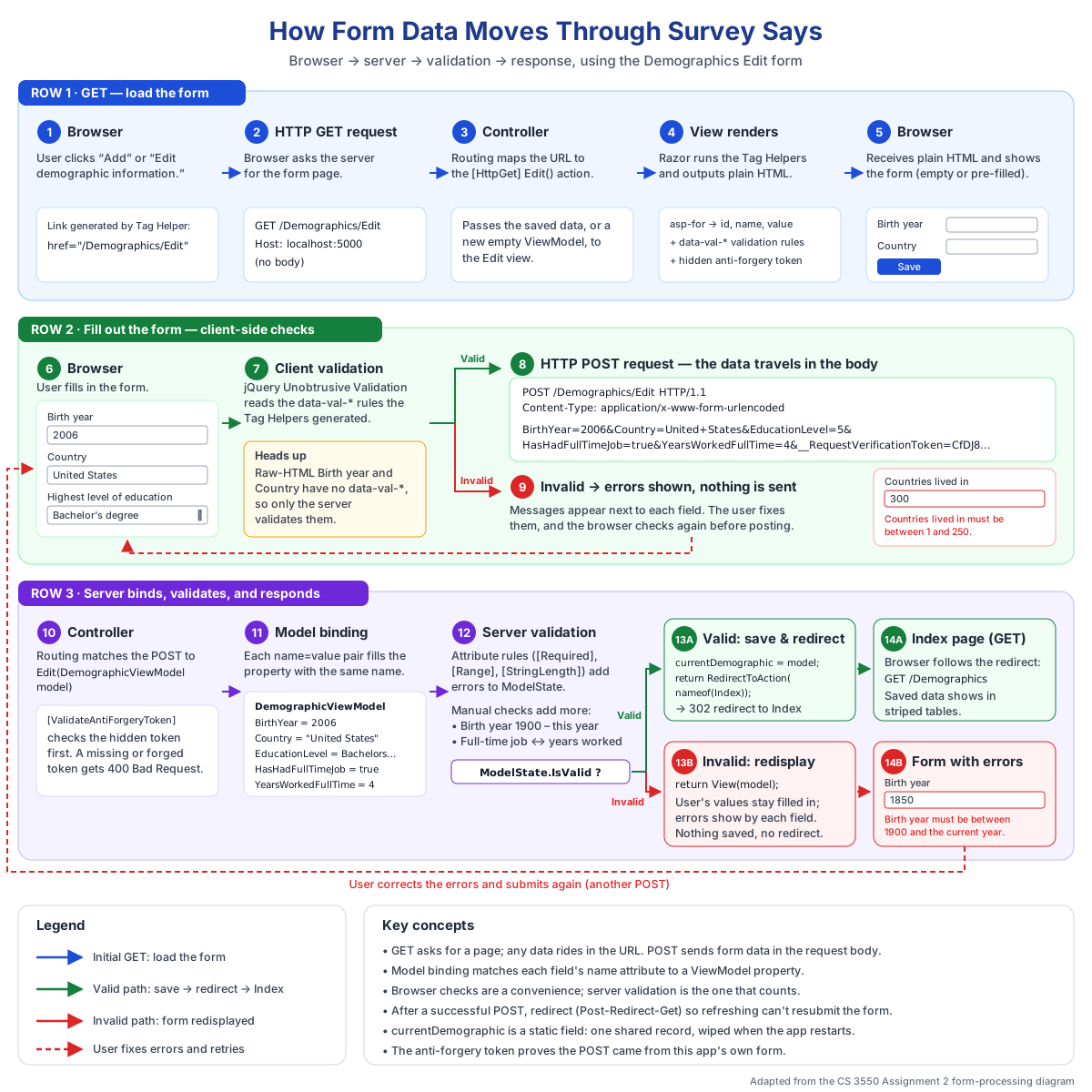 How form data moves through Survey Says, from the initial GET through validation to either
a redirect or a redisplayed form. Adapted from the CS 3550 Assignment 2 diagram.
How form data moves through Survey Says, from the initial GET through validation to either
a redirect or a redisplayed form. Adapted from the CS 3550 Assignment 2 diagram.
Open the full-size form processing diagram
GET vs. POST
A GET request asks the server for something, like a page. Any data it sends
goes in the URL, so it should never change anything on the server. Clicking a link or
typing an address sends a GET.
A POST request sends data to the server to be processed, and that data goes
in the request body instead of the URL. Submitting a form with
method="post" sends a POST. That's why displaying the Edit form is a GET, but
saving it is a POST.
How the Browser Sends Form Data
When the user clicks Save, the browser goes through every form control that has a
name attribute and builds a list of name/value pairs. It joins
them with & and puts them in the body of the POST request:
POST /Demographics/Edit HTTP/1.1
Content-Type: application/x-www-form-urlencoded

BirthYear=2006&Country=United+States&EducationLevel=5&HasHadFullTimeJob=true
A control without a name is never sent. Enum dropdowns send the enum's number,
not its display text.
Connecting Form Controls to ViewModel Properties
The name attribute is the link between the HTML and the C# code. An input
written as <input name="Country"> sends a pair named
Country, and ASP.NET Core puts that value into the ViewModel's
Country property. If the name is misspelled, the property is simply left
empty. There's no error, just missing data.
In the Edit form, Birth year and Country are written in plain HTML, so we typed the
name, id, and value attributes ourselves. Every other
control uses a Tag Helper like asp-for="Country", which generates those
attributes on the server. The browser never sees asp-for, only the plain HTML
it produces.
Model Binding
Before the POST Edit action runs, ASP.NET Core creates a new
DemographicViewModel and fills it in. For each property, it looks for a
submitted pair with the same name and converts the text into the property's type, such as
turning "2006" into an int? or "true" into a
bool?. This process is called model binding, and the finished
object is passed into the action as its model parameter.
Optional values use nullable types so that "left blank" becomes null instead of
a misleading default like 0 or false.
Two Kinds of Validation
Attribute-Based Validation
Rules like [Required], [Range], and
[StringLength] are placed on ViewModel properties. ASP.NET Core checks them
automatically during model binding and records any failures. The same rules are also sent
to the browser as data-val-* attributes, so JavaScript can catch mistakes
before the form is even submitted.
Manual Controller Validation
Some rules are checked by hand in the controller. Birth year is validated manually because
its upper limit is the current year, which changes. The full-time job rule compares two
fields: years worked is required only if the user has had a full-time job. When a manual
check fails, the controller calls ModelState.AddModelError to record the
problem for that field.
Browser checks are a convenience that can be skipped or bypassed. The server's validation
is the one that actually protects the data.
What ModelState.IsValid Means
ModelState holds the submitted values and every error found for them, from both
the attributes and the manual checks. ModelState.IsValid is
true only when there are no errors at all. That's why the manual checks run
first: their errors need to be recorded before the controller asks whether the data is
valid.
Invalid Data: Return the Edit View
If the data is invalid, the action runs return View(model);. This sends back
the same Edit form, filled in with what the user typed, plus an error message next to each
problem field. Nothing is saved. Redirecting instead would start a brand-new request, and
the user's input and error messages would be lost.
Valid Data: Redirect to Index
If the data is valid, the action saves it and runs
return RedirectToAction(nameof(Index));. This tells the browser to make a new
GET request for the Index page. This pattern is called Post-Redirect-Get:
GET /Demographics/Edit loads the form.POST /Demographics/Edit submits and saves it.GET /Demographics shows the saved result.
Because the last request is a GET, refreshing the page just reloads Index. Without the
redirect, refreshing would ask the browser to submit the form a second time.
Why Saved Data Disappears on Restart
For now, the saved data lives in a static field on the controller. A static
field belongs to the class, not to any single request, so it lasts between requests. But it
only exists in the running program's memory. When the app stops, that memory is released
and the data is gone.
A static field is also shared by every user and holds only one record, so each save
overwrites the last. A database, which we'll add later, fixes both problems by storing data
permanently and separately for each user.